
A developer's laptop holds more sensitive data than most people realize: API keys, database credentials, staging environment secrets, and sometimes entire copies of production data pulled down "just for testing."
End-users are responsible for 75% of internal data-loss incidents, most of them accidental rather than malicious. For a dev team, that risk concentrates on the endpoint, the machine where code gets written, tested, and pushed.
Here's how to build a strategy that protects that machine without slowing your team down.
Table of Contents
How to Build an Endpoint Data Loss Prevention Strategy
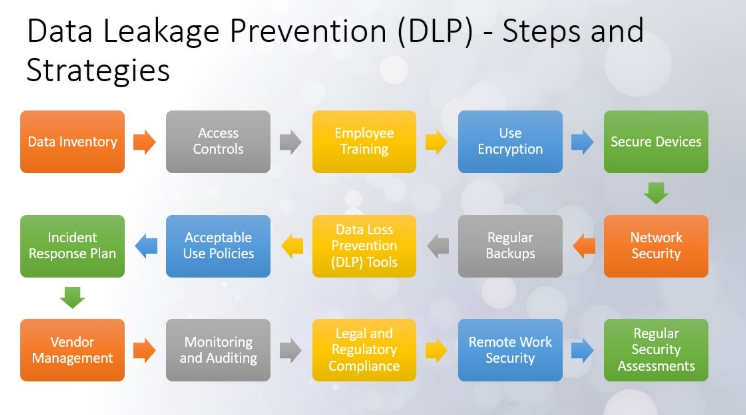
Step 1: Map Where Sensitive Data Lives in the Endpoint
Start by finding out where secrets and sensitive data sit across your team's machines. Likely candidates are things like config files with hardcoded credentials, .env files that never made it to .gitignore, and cached database dumps from a debugging session six months ago that nobody remembered to delete.
Anything that qualifies as a backup, even an ad hoc one, should be treated as sensitive data in its own right. So if the backup encryption isn't in place, that copy is just as vulnerable as the original source of data.
Most teams are surprised by what turns up once they start looking. A short audit across a handful of laptops usually reveals the same handful of habits repeating across a whole team, since one developer's shortcut tends to spread once it works one time.
A simple spreadsheet tracking what kind of sensitive data lives where and on which machines gives the rest of this strategy something concrete to build on. Skip this step and every control that follows ends up guessing at what it's supposed to be protecting.
Try this first:
Choose three to five developer machines to begin your initial audit.
Search typical locations for environment files, credentials, database dumps, and private keys.
Record the finding, file location, data type, owner, and note if the data is still needed.
Remove unnecessary copies and update credentials that might have been exposed.
For a Linux machine, a basic first pass could look like:
find ~ -type f \( -name ".env" -o -name "*.pem" -o -name "*.key" \) 2>/dev/null
This approach won't uncover every secret, but it gives your team a solid starting inventory.
For example, if the audit finds ~/projects/client-api/.env containing a database password, you need to move the credential to a secret manager, delete the local file, and update the password.
Step 2: Set Access Control as the Foundation
Every endpoint DLP strategy sits on top of a working access control system. If every developer can pull production credentials regardless of their role, no amount of monitoring downstream will fix that gap.
Scalable access control that's built around roles and attributes limits what a compromised laptop can expose in the first place. After all, a stolen set of credentials only matters as much as the permissions attached to them.
This is also the cheapest control on this whole list to get wrong, and one of the easiest to fix.
Reviewing who has access to what on a recurring schedule rather than once at onboarding will catch the slow creep of permissions that no one remembered to revoke after a project ended.
A simple implementation process:
List production systems and sensitive resources.
Create roles such as developer, senior developer, DevOps, and administrator.
Document which resources each role actually needs.
Remove permissions that don't support someone's current work.
Review access whenever someone changes projects or leaves the team.
The difference between too much access and appropriate access is easier to see side by side. Here's the same developer role, granted two different ways in Postgres.
Too much access:
-- One role, every database, every table, every operation

GRANT ALL PRIVILEGES ON DATABASE prod_db TO dev_team;

GRANT ALL PRIVILEGES ON ALL TABLES IN SCHEMA public TO dev_team;
Appropriate access:
-- Full access where the work actually happens

GRANT CONNECT ON DATABASE staging_db TO dev_team;

GRANT USAGE ON SCHEMA public TO dev_team;

GRANT SELECT, INSERT, UPDATE, DELETE ON ALL TABLES IN SCHEMA public TO dev_team;
-- No standing connection to production at all

REVOKE ALL ON DATABASE prod_db FROM dev_team;
The same idea maps cleanly onto a role table, which is usually the easier version to hand to a team:
Role | Dev / staging DB | Production DB | Secret Manager | Cloud Console |
|---|---|---|---|---|
Developer | Read + write | None | Read, own project only | None |
Senior Developer | Read + write | Read-only, time-limited | Read, own team's projects | Read-only |
DevOps | Read + write | Write, scoped to deploys | Read + write | Admin, scoped |
Administrator | Read + write | Full | Full | Full |
For example, a developer should have read and write access to the development and staging databases since those environments are part of their regular work. They shouldn't have direct access to the production database. A DevOps team member may need controlled production access for deployment and troubleshooting, with that access limited to the tasks they're responsible for.
Step 3: Harden the Endpoint OS Layer
Most development machines run some flavor of Linux, whether directly or through WSL, and the operating system layer is where a lot of DLP controls end up getting enforced day to day: file permissions, disk encryption, and keeping user privileges properly separated.
Getting comfortable with core Linux commands makes it a lot easier to audit what's running on a machine, lock file permissions down the right way, and catch something out of place before it turns into a real problem.
Disk encryption also deserves a mention here. Steal a laptop with an unencrypted drive, and everything on it just hands itself over, no password needed, the moment someone pulls the disk and mounts it somewhere else.
Turn on full-disk encryption, and that same stolen laptop becomes a much smaller headache.
For Linux developers, here are a few commands you can run during an endpoint review:
whoami
sudo -l
ls -la ~/.ssh
df -h
These commands can help identify the current user, available sudo privileges, SSH files, and disk usage.
File permissions are where this gets specific. A secret sitting in a world-readable file is available to every process and every account on that machine, which quietly cancels out the access control work from the previous step.
Check what the permissions actually are before changing anything:
ls -la ~/.ssh
find ~/projects -name ".env" -exec ls -l {} \;
Output worth acting on looks like this:
-rw-r--r-- 1 dev staff 1704 Mar 12 09:14 /home/dev/.ssh/id_ed25519
-rw-rw-r-- 1 dev staff 612 Mar 12 09:14 /home/dev/projects/client-api/.env
Those trailing r-- bits mean group members and every other user on the box can read a private key and a set of credentials. Tighten them so only the owner can access:
chmod 700 ~/.ssh # directory: owner only
chmod 600 ~/.ssh/id_ed25519 # private key: owner read/write
chmod 644 ~/.ssh/id_ed25519.pub
chmod 600 ~/projects/client-api/.env
To sweep a whole projects directory at once:
find ~/projects -name ".env" -exec chmod 600 {} \;
Then give the actual hardening sequence:
Enable full-disk encryption.
Keep the OS and security updates current.
Remove unnecessary administrator privileges.
Review SSH keys and remove unused ones.
Enable screen locking.
Configure endpoint monitoring where appropriate.
For example, if a developer's laptop has an old SSH key belonging to a previous project, remove it and revoke the corresponding access rather than leaving it available indefinitely.
Some teams sidestep this risk at the source by moving development onto a virtual desktop infrastructure, where sensitive data lives centrally rather than on the physical machine. But this just relocates the DLP burden rather than removing it, since the virtual environment itself now needs the same access controls and monitoring to protect VMs from data loss.
Step 4: Lock Down Containers and Local Environments
Local development increasingly happens inside containers, and each one is a small self-contained environment that can end up holding secrets if developers aren't careful about what gets stored in it.
A .env file might get baked into an image or credentials might sit in a container's environment variables long after a project wraps up.
Learning to work properly with Docker includes understanding how to keep secrets out of images entirely, using secret managers or runtime injection instead of hardcoding anything into a Dockerfile.
Here's a Dockerfile that looks perfectly straightforward and leaks in two different ways:
FROM node:20
WORKDIR /app
# Problem 1: copies everything, including .env, *.pem, and .git history
COPY . .
# Problem 2: the value is written into an image layer, permanently
ENV DB_PASSWORD="prod-9f2a-4c11-secret"
RUN npm install
CMD ["node", "server.js"]
Deleting the file in a later layer doesn't help, because the earlier layer still contains it. Anyone who pulls the image can read both:
docker history --no-trunc my-app:latest | grep -i password

docker run --rm -it --entrypoint sh my-app:latest -c "cat .env"
The corrected version starts with a .dockerignore, which keeps the sensitive files out of the build context entirely:
# .dockerignore

.env

.env.*

*.pem

*.key

.git

node_modules
Then copy only what the application needs and leave credentials out of the image:
FROM node:20

WORKDIR /app
COPY package*.json ./
RUN npm ci --omit=dev
# Copy application code only, not the whole directory
COPY src ./src
CMD ["node", "src/server.js"]
Supply the credential at runtime instead:
docker run -e DB_PASSWORD="$DB_PASSWORD" my-app:latest
Practical check: Before pushing an image, scan it for .env files, private keys, credentials, and other sensitive data.
Step 5: Catch Leaks Before They Ship
If you catch a leak early, it might cost you less loss.
Wire automated secret scanning into a CI/CD pipeline, and a hardcoded API key gets flagged before it ever reaches a public repository.
Gitleaks and TruffleHog both handle this well by running right in the pipeline and failing the build as soon as a potential credential is detected in a commit.
Tuning the alerting properly takes some patience, but skipping that step tends to backfire. A scanner that keeps crying wolf with false positives encourages a team to click past every warning without even reading it. So, it's worth spending the setup time getting the rules to fit your codebase properly.
For example, a GitHub Actions workflow can run Gitleaks before code reaches production:
name: Secret Scan

on:

  pull_request:

  push:

jobs:

  gitleaks:

    runs-on: ubuntu-latest

    steps:

      - uses: actions/checkout@v4

        with:
          fetch-depth: 0

      - uses: gitleaks/gitleaks-action@v2
With this setup, the repository gets scanned whenever developers push code or open a pull request. If Gitleaks detects a potential credential, the workflow can stop before the change moves further through the deployment process.
A caught secret shows up in the workflow log looking roughly like this:
Finding:     AWS_SECRET_ACCESS_KEY=wJalrXUtnFEMI...
Secret:      wJalrXUtnFEMI/K7MDENG/bPxRfiCYEXAMPLEKEY
RuleID:      aws-access-token
Entropy:     4.31
File:        services/billing/.env.staging
Line:        12
Commit:      8f2a1c9dbe4477a1c0f9e2b3a5d7c8e1f0a2b3c4
Author:      dev@example.com
INF 14 commits scanned.
WRN leaks found: 1
Error: Process completed with exit code 1.
The non-zero exit code is what actually blocks the merge. The file name, line number, and commit hash tell whoever picks it up exactly where to look.
Tuning the alerting properly takes some patience, but skipping that step tends to backfire. Again, you don't want constant false positives causing your team to click past every warning without looking at it. So take the time to get the rules to fit your codebase.
That tuning happens in a .gitleaks.toml at the repository root, where you exempt the paths that legitimately contain fake credentials:
[extend]
useDefault = true

[[rules]]
id = "aws-access-token"
  [rules.allowlist]
  paths = [
    '''tests/fixtures/.*''',
    '''docs/examples/.*'''
  ]
  regexes = [
    '''AKIAIOSFODNN7EXAMPLE'''
  ]
Keep the allowlist narrow. Exempting a whole directory because one file in it kept tripping the scanner is how real credentials start slipping through.
For example, a developer accidentally commits an API key to a pull request. Gitleaks flags it during the workflow, the pull request can't proceed, and the team removes the key and rotates the credential before merging the code.
Step 6: Extend Coverage to Public-Facing Surfaces
Most endpoint DLP strategies focus on laptops and dev machines, but public websites need the same scrutiny, even when they're maintained outside the engineering team.
You might have a poorly configured contact form, a staging subdomain someone forgot was still live, and an admin panel nobody locked down properly. An API security testing platform can test exposed APIs for vulnerabilities and business logic flaws before they put sensitive data at risk. Any one of those can leak data just as easily as a careless commit ever could.
Part of the problem is that web design and security often get treated as separate jobs handled by separate people. Sites built with hosting, maintenance, and security combined into the process from the start hold up far better than ones where those pieces get tacked on after something goes wrong.
This kind of ongoing oversight matters for a public-facing site the same way endpoint monitoring matters for a developer's machine. Unattended surfaces are where problems tend to build up slowly, unnoticed, until something forces a closer look.
If your dev team owns the marketing site too, treat it as a part of the same DLP scope, handled with the same routine attention as everything else, rather than something someone gets to whenever there's some spare time.
A simple monthly check can catch these issues before they become forgotten infrastructure. Start by listing every active domain and subdomain, then check whether each one still needs to be publicly accessible.
Here's how that usually plays out in practice. A team ships a customer portal rewrite and spins up staging-v2.example.com to demo it to stakeholders. The launch goes fine. Nobody deletes the staging environment, and it keeps running on a copy of the production database that was loaded for the demo.
Eight months later, a routine subdomain sweep turns it up:
# Every subdomain still resolving
dig +short staging-v2.example.com
203.0.113.47
# Is it publicly reachable, and does it need auth?
curl -s -o /dev/null -w "%{http_code}\n" https://staging-v2.example.com/api/v1/customers
200
A 200 with no credentials attached is the problem. Pulling the first record confirms it:
curl -s https://staging-v2.example.com/api/v1/customers | head -c 200
[{"id":4471,"email":"real.customer@example.com","phone":"+1-555-0142",
"plan":"enterprise","last_invoice":"2025-11-03"}]
That's production customer data sitting on an unauthenticated endpoint, indexed by anyone scanning certificate transparency logs for subdomains. The fix has an order to it:
Take the environment offline immediately, before anything else.
Check access logs to see if anyone else found it first.
Decide whether the environment is still needed. If not, delete it and remove the DNS record.
If it's needed, put it behind authentication or an IP allowlist and replace the database with generated test data.
Add every subdomain to the monthly inventory so the next one doesn't sit unnoticed for eight months.
Keep the same review for public forms, admin panels, cloud storage, and unused API endpoints. The goal is to make every internet-facing surface something the team knows about and actively maintains.
Step 7: Monitor, Measure, and Keep Policies Honest
A DLP strategy without measurement isn't a good strategy. Teams need visibility into where data exposure is showing up in practice, the same way marketing teams have started tracking brand visibility across AI platforms.
For insurance, Similarweb’s AEO platform built for that purpose tracks where and how a brand gets mentioned across AI-generated answers, catching patterns nobody would ever spot by checking one prompt at a time by hand.
Security monitoring for endpoints runs on that same idea. Without a dashboard showing where secrets are exposed or which machines have drifted out of compliance, a team spends its energy cleaning up after incidents instead of catching them early.
The same principle applies to backups: an untested backup is merely an assumption. Regularly testing your disaster recovery plan ensures that your data backup strategy works properly when issues arise.
That principle doesn't stop at the laptop, either. Most companies store sensitive data across Microsoft 365 (mailboxes, SharePoint sites, OneDrive folders, or Teams channels) and it's usually the dev or IT team's job to make sure that data is actually protected, not just retained.
Microsoft's native retention covers accidental deletion within a short window. It isn't built to recover from ransomware or a compromised account that goes unnoticed for weeks. Teams relying on that retention alone, without an independent backup for Microsoft 365 data, are making the same unverified assumption this article already warns against with local backups.
Policy matters here just as much as any of the tooling does.
A policy only works if the people bound by it actually believe in it, and that part is harder to measure than tooling compliance. This is where an anonymous employee confidence tool earns its place, showing whether a team genuinely trusts a security rule or is just quietly routing around it.
Security policies have a similar challenge. Vague one-size-fits-all rules dropped on a team without context can be difficult for developers to follow in practice. Give a team a policy nobody understands and eventually they'll build a workaround for it, regardless of how well-meaning it was when someone wrote it.
Rules that are specific and come with a clear explanation tend to hold up better than a generic PDF buried three folders deep in onboarding.
A security dashboard simplifies the review process. Track the number of secrets detected, endpoints outside required controls, permission changes, and resolution times for each issue.
For a team of twenty developers, that dashboard doesn't need to be more complicated than this:
Metric | Last month | This month | Target | Direction |
|---|---|---|---|---|
Secrets caught in CI | 6 | 2 | 0 | Improving |
Secrets found in merged code | 1 | 0 | 0 | Improving |
Endpoints with full-disk encryption | 17 / 20 | 20 / 20 | 100% | Met |
Machines missing security updates (30+ days) | 4 | 5 | 0 | Worsening |
Standing production DB access | 9 users | 3 users | 0 | Met |
Unreviewed subdomains | 11 | 0 | 0 | Met |
Median time to rotate an exposed credential | 3 days | 6 hours | Under 24 hours | Improving |
Two things stand out immediately in a table like that, and neither would be obvious from an incident report.
Secrets are getting caught in CI instead of after merge, which means step 5 is doing its job.
Patching is going backwards, which means something in the update process isn't working and another reminder email is unlikely to fix it.
For example, if you see that a secret scanner detected an AWS credential in a pull request, stop the merge, revoke or rotate the credential, remove it from the repository, and check for its presence elsewhere. Investigate why the credential was accessible to the developer and update the workflow to prevent recurrence.
Make sure to monitor these metrics regularly instead of waiting for an incident. If the same violations continue, consider implementing clearer policies, improved tools, or a streamlined development process rather than issuing additional warnings.
Build Security Into How Your Team Already Works
A strong DLP strategy doesn't mean slowing engineers down with endless approval steps or locking every laptop into a rigid corporate image, and it shouldn't come at the cost of customer experience either, since the whole point of shipping fast is to serve users well without exposing their data in the process.
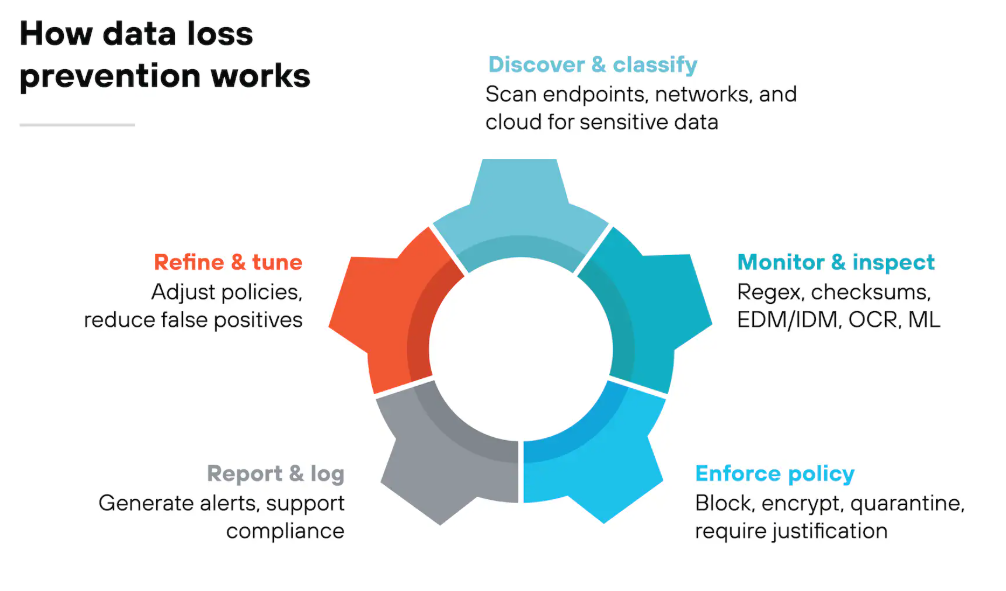
The strongest endpoint DLP strategies just run in the background, mostly invisible day to day: access control keeping blast radius small, CI/CD checks catching mistakes before they ship, and monitoring pointing a team toward its real gaps instead of leaving everyone to guess.
Start with access control and CI/CD, since those two catch common mistakes with minimal friction, and build outward once that foundation is solid.
Picking up suitable tools, including the best backup software, behind each of these steps makes the whole thing far easier to build and keep running over time.
Anyone looking to strengthen those foundations, whether that's Linux fundamentals, containerization, or CI/CD pipelines, will find free and practical guides covering precisely this kind of work over at freeCodeCamp.